PDCA Cycle of Quality Management: ECLIPSE Software can support
18 Aug, 2026
The Plan, Do, Check, Act (PDCA) cycle is a familiar approach to continuous improvement. Yet the connections between its phases can easily receive less attention. Requirements, engineering work, reviews, and corrective actions may be managed separately, making it harder to carry information from one phase to the next. ECLIPSE Software Suite supports this flow by keeping related quality and engineering information connected throughout the lifecycle.
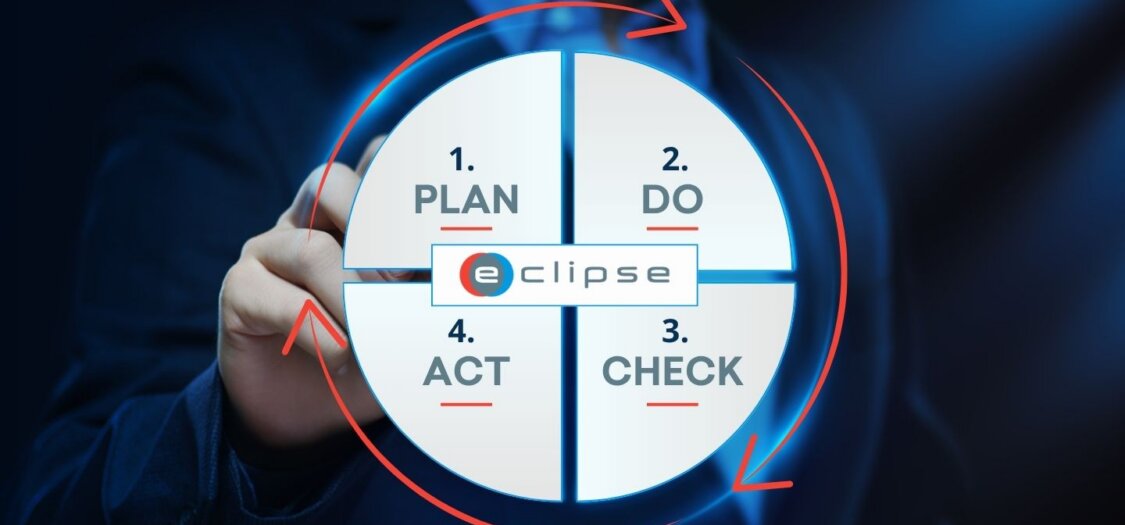
The PDCA cycle in quality management
PDCA provides a continuous cycle for managing work and learning from the results. Each phase has a clear purpose:
- Plan: Define objectives, requirements, risks, processes, and how results will be assessed.
- Do: Carry out the planned work under controlled conditions and collect the information needed to evaluate the results.
- Check: Compare the results with the requirements and criteria defined during Plan.
- Act: Use what was learned to correct issues, make improvements, and feed lessons into future planning.
These phases work together rather than as four separate processes. Check, for example, needs information from both Plan and Do. It needs to know what was expected and what was actually achieved. Act then uses the findings from that comparison to decide what should change.
Traceability helps keep these relationships visible. Teams can follow information from a requirement to the work based on it, then to the review used to check it and any action that follows. This creates the foundation for a closed PDCA loop.
Plan: create a clear basis for the work
The Plan phase defines what the project needs to achieve and how the expected results will be assessed. Requirements provide an important starting point, while risks and verification criteria give teams the context needed to plan the work.
ECLIPSE supports the Plan phase through:
- Centralized requirements management: keeping requirements in one controlled environment, ensuring changes to requirements are tracked..
- Requirements traceability: connecting requirements with related engineering information and ensuring stakeholders can access requirements.
- Risk links: connecting risks with the requirements or activities they affect.
- Verification links: defining how requirements will later be checked.
These connections give teams a clear basis for the work ahead. Requirements remain active throughout the lifecycle rather than becoming documents that are only consulted during planning.
Plan to Do: turn requirements into controlled work
Plan needs to provide clear input for the work performed during Do. Approved requirements and related information therefore need to connect to the documents, configurations, and activities used during execution.
For example, a requirement may state that a component must operate within a defined temperature range. During Plan, the team records this requirement and defines how it will be verified. During Do, engineers use the requirement when developing an initial prototype of the component and its supporting documentation. The prototype gives the team something they can evaluate against the original requirement before moving further with the design.
ECLIPSE helps maintain the link between the original requirement and the information used during execution. What is defined during Plan can therefore remain visible when the team moves into Do.
Do: execute using controlled information
The Do phase is where teams put the plan into practice. Engineers create technical information, develop solutions, implement approved changes, and perform activities based on the requirements defined during Plan.
In engineering development, Do can include an initial solution, prototype, test batch, or another controlled implementation. This gives the team a practical result that can be evaluated during Check. The exact form depends on the project and where PDCA is being applied.
Teams also need controlled information to keep this work consistent. They need to know which documents are approved and which configuration applies to the work they are performing.
ECLIPSE supports the Do phase through:
- Version control: keeping approved versions of engineering information available.
- Configuration baselines: defining which information applies at a given point in the project.
- Document approval workflows: managing the review and approval of information before use.
- Change traceability: keeping changes connected to related engineering information.
These controls create a clear record of what was used during execution. They also provide the context needed to evaluate the results during Check.
Do to Check: compare results with the original requirements
Check brings together two sides of the PDCA cycle: what was planned and what was achieved. The team needs the results from Do as well as the requirements and verification criteria defined during Plan.
Take the temperature requirement as an example. During Do, engineers develop an initial prototype using the approved requirement and technical information. During Check, they test the prototype against the temperature range defined during Plan. The results show whether the design performs as expected and where changes may be needed.
ECLIPSE helps keep the requirement, supporting engineering information, and verification activities connected throughout this process. The team can therefore compare the result from Do directly with what was defined during Plan.
Check: turn verification into useful feedback
The Check phase determines whether the results meet the requirements and criteria defined during Plan. Depending on the project, this can include verification activities, technical reviews, measurements, testing, or other forms of evaluation.
Within ECLIPSE, technical reviews provide a structured way to manage part of this process. Review findings can remain connected to the requirements and engineering information being assessed.
ECLIPSE supports the Check phase through:
- Technical review management: keeping review activities in a structured environment.
- Links between findings and requirements: showing which requirement is related to a finding.
- Links to supporting information: keeping relevant engineering information available during a review.
- Review item tracking: following findings as they move through the review process.
These connections give findings context. Teams can see what was expected, what was found, and which engineering information is involved.
Check to Act: turn findings into improvements
The findings from Check provide the starting point for Act. The team uses them to understand what needs to change and decide how that change should be managed.
For example, testing may show that the prototype does not meet the required temperature range. Because the finding remains connected to the original requirement and supporting technical information, the team can investigate what caused the difference. This may lead to a design change or another corrective action.
What the team finds during Check therefore becomes input for improving the solution during Act.
Act: turn findings into lasting improvements
During Act, teams use the findings from Check to make improvements. This can include correcting an issue, addressing its root cause, updating engineering information, or applying a successful change more widely.
ECLIPSE supports the Act phase through:
- Non-conformance management: recording and managing deviations within a structured process.
- Root-cause links: connecting an issue with its cause and related engineering information.
- Corrective and preventive action tracking: following actions through implementation and completion.
- Links to requirements and risks: keeping the wider engineering context of the issue visible.
Act is therefore about more than closing an individual finding. When a change works, teams can make it part of the controlled way of working. The knowledge gained can also become input for future engineering decisions.
Act to Plan: feed lessons into the next cycle
The connection from Act back to Plan closes the PDCA loop. The team takes what it learned and uses that knowledge when requirements, risks, processes, or verification activities are planned again.
Return to the temperature example. Testing may show that a design change allows the component to meet the required temperature range. During Act, the team can implement the successful change and update the relevant controlled information. If the investigation also reveals a new risk or useful design lesson, that information can feed into future planning.
The next PDCA cycle then starts with knowledge gained from the previous one. This is what closes the loop: the team does not only solve the current issue, but also carries the lesson forward.
Manage your PDCA cycle with ECLIPSE
PDCA works as a continuous improvement cycle when information keeps moving between its phases. Plan defines the expected result. Do puts the plan into practice. Check compares the result with what was expected. Act uses those findings to improve the work and feed lessons into the next Plan phase.
ECLIPSE Software Suite helps teams keep these connections visible across the engineering lifecycle. Requirements can remain linked to risks and verification activities, while controlled documentation supports execution. Review findings and non-conformances can then connect to actions and future planning.
The result is a PDCA cycle where teams can follow information from the original requirement through execution, verification, and improvement. Lessons from completed work can then become part of the next cycle.
Want to connect your PDCA cycle and keep the feedback loop moving? Contact us to discuss how ECLIPSE Software Suite can support closed-loop quality management across your engineering lifecycle.