What is RID?
02 Feb, 2026
In projects, especially within the space and engineering sectors, review and issue management are critical to ensuring quality, compliance, and timely delivery. RID is a system designed to support organizations in managing the entire review lifecycle, from submission to closure.
Built in alignment with the ECSS-M-ST-10-01C standard, RID enables consistent, transparent, and collaborative review processes across all stakeholders. It integrates document control, review workflows, issue tracking, and reporting into a single platform, ensuring that all activities are properly managed and traceable.
The following section is about how eRID works, its key features, and the step-by-step RID workflow.
RID Workflow Steps
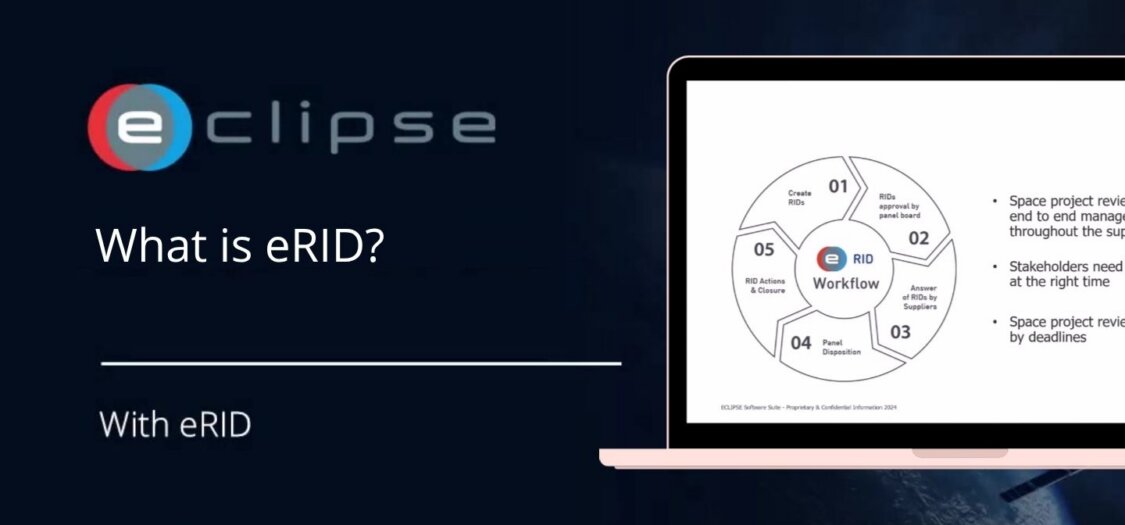
The RID workflow outlines the process for identifying, reviewing, resolving, and closing review items to ensure all issues are managed throughout the review lifecycle.
01. Create RIDs
- Issues, comments, or discrepancies are identified during reviews.
- These are logged as RIDs in the system.
02. RID Approval by Panel Board
- The review panel evaluates the RIDs.
- They validate and approve them for further action.
03. Answer of RIDs by Suppliers
- Suppliers or responsible parties provide responses to the RIDs.
- They propose solutions or clarifications.
04. Panel Disposition
- The panel reviews the supplier responses.
- Decisions are made (accept, reject, request changes, etc.).
05. RID Actions & Closure
- Final actions are completed.
- RIDs are closed once fully resolved
Core Principles of the RID Process
The effectiveness of the eRID workflow is built on a set of key principles that ensure reviews are comprehensive, collaborative, and completed on time across all stages of a project.
- End-to-End Management: Space project reviews require full lifecycle tracking across the supply chain.
- Stakeholder Involvement: Different stakeholders (panels, suppliers, managers) must be involved at the right stages.
- Deadline-Driven Process: Reviews operate under strict timelines to keep projects on schedule.
How does RID work?
RID provides a structured approach to managing document reviews by guiding data from initial import in DCCM through multiple review phases, while ensuring clear responsibilities, controlled deadlines, and full lifecycle tracking of review items (RIDs) until resolution. RID provides tools to manage technical document reviews, track issues, and support collaboration through reporting, forms, and follow-up actions. This step-by-step process shows how document data is imported, reviewed, and managed through its lifecycle using DCCM and RID.
1. Data Pack Import (DCCM)
- A documentalist imports a data pack into the DCCM system.
- This is the starting point where all documents enter the workflow.
2. Assignment to RID Review
- A review manager assigns the data pack to a RID review.
- Deadlines are set and managed for creators, panel board members or secretaries, and contractors to ensure the review process progresses on time.
- This triggers the formal review process.
3. Review Workflow Phases
The review moves through several structured phases:
- Kick-off: Review process begins
- RID Creation: Review comments/issues are created
- Panel Phase: Internal review and discussion
- Contractor Phase: External/contractor input
- Co-location: Collaborative resolution
- Disposition: Final decisions and closure
Documents are continuously reviewed throughout the process, while RIDs are tracked, managed, and resolved across their entire lifecycle.
Main Features Explained
RID is not just a review tool, it is a complete system that controls document revisions, provides real-time reporting, simplifies issue creation, enables powerful search and linking, and ensures proper follow-up and resolution of all actions.
Revision Control of Technical Documentation
- Tracks document versions, status, and updates.
- Ensures everyone is working on the correct and latest revision.
- Maintains a structured history of changes.
Simple RID Forms
- User-friendly forms to create and manage RIDs.
- Standardized fields ensure consistency in issue reporting.
- Makes it easy for users to submit and track review comments
Search and Relate RIDs
- Allows users to search for specific RIDs quickly.
- Enables linking related RIDs together.
- Helps identify dependencies and avoid duplication.
Follow-up Actions with AIM
- Tracks actions required after reviews.
- Ensures issues are addressed and resolved.
- Supports accountability and closure of tasks.
Reporting with DASH
- Provides dashboards with visual insights (charts/graphs).
- Shows:
- Number of RIDs by status (open, closed, etc.)
- Classification of RIDs (major, minor, etc.)
- Distribution across panels
- Helps teams monitor progress and performance.
RID is designed to help projects and organizations carry out document reviews in a structured and standardized way, following an official industry standard.
RID Framework and Standardization
RID is built to meet recognized ECSS standards, ensuring structured and consistent review processes, alignment with industry best practices, and reliable management of reviews across projects and organizations. Its primary purpose is to support teams in organizing and managing review activities, enabling consistency and clarity across different projects and stakeholders.
The system is based on the ECSS-M-ST-10-01C standard, which provides formal guidelines for how reviews should be organized and conducted. This standard defines how review processes are planned, executed, and managed, ensuring clear roles, responsibilities, and procedures throughout the entire lifecycle.
Conclusion
RID provides a structured approach to managing document reviews in projects, ensuring that every stage, from data import to final RID closure, is controlled, traceable, and efficient. By combining a clear workflow, defined responsibilities, and strong lifecycle management, it enables teams to collaborate effectively and address issues fast.